

What Is the Appointment App?
The Appointment App is the Faprika app that lets your customers see a free time on your site or your store's phone app and book their own appointment. You enter your branches, working hours, services and their durations once; the system calculates the free times, the customer selects their time, and no one else can take that time. It is designed for businesses that work by appointment, such as hairdressers, beauty salons, service businesses or pet groomers.
In short, asking "is this time free?" on the phone, looking for a time in a notebook and fixing double bookings afterwards all go away. The appointment is made on your site and in your app, the customer's first point of contact with you, in your own color and logo.
How Does the Appointment App Work?
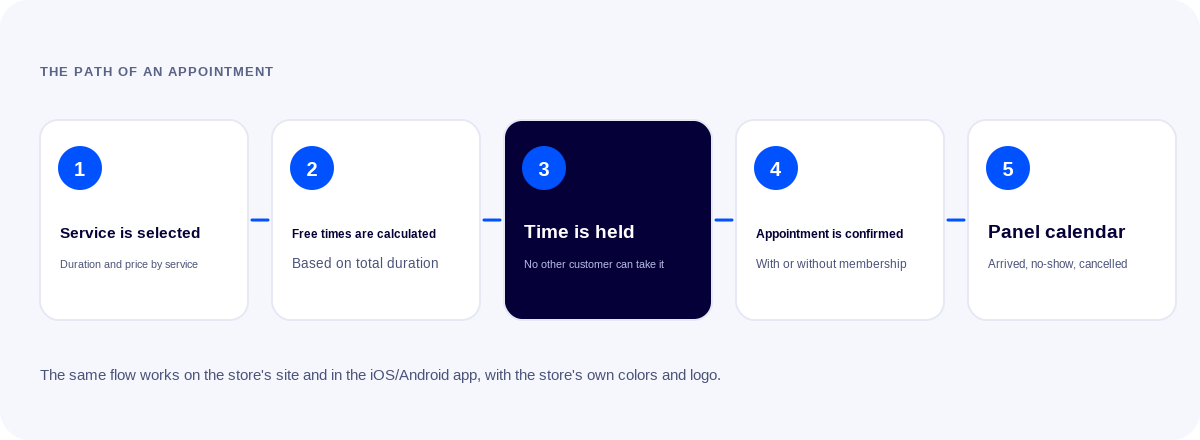
- You add the app: You add Appointment from the Apps section in the Faprika panel.
- You define your business: You enter your branches, working hours, services, durations and prices.
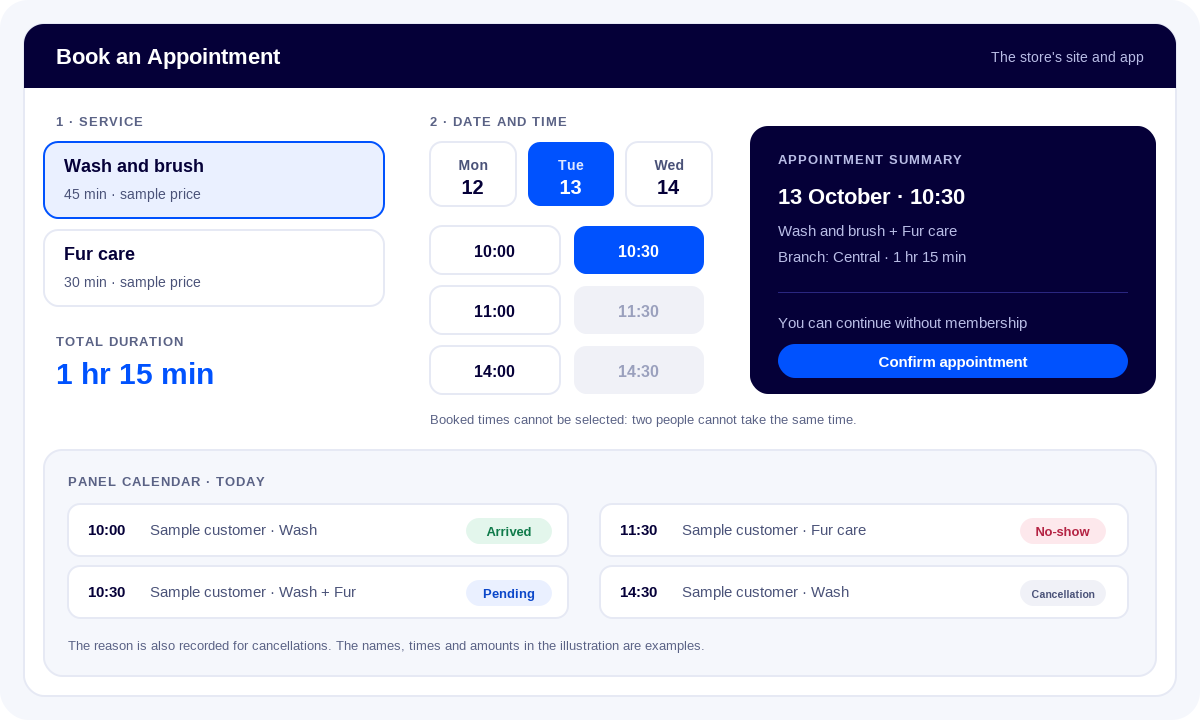
- The customer sees the free time: On your site or in your store's phone app, the customer selects their service; the free times calculated for that selection are listed.
- He or she selects the time: The moment the customer selects a time, that spot is held for them for a short period; another customer cannot take the same spot.
- The appointment lands in your panel: The day's appointments appear in the panel calendar; you mark them as arrived, no-show or cancelled.
Features of the Appointment App
1. Branches: each branch with its own rules
You set the working hours, lunch break and closed days separately for each branch. You also enter how many customers a branch can serve at the same time; this corresponds to the number of chairs or tables. That way, a branch with two chairs can take two customers for the same time, and a branch with one chair can take one.
2. Services, durations and prices
For each service, you enter the duration, the preparation margin and the price. The price and duration can change depending on the customer's choice; for example, at a pet groomer, a separate duration and fee are defined for small, medium and large dogs.
3. Smart time calculation
Free times are calculated not in fixed slots but according to the total duration of the selected services. The store chooses a 15, 30 or 60-minute interval. The customer can take multiple services in the same appointment; the system calculates the total duration and shows the suitable times.
4. No double bookings
The moment the customer selects a time, that spot is held for them for a short period. Another customer trying to book at the same moment cannot take that spot; two people cannot take the same time.
5. Booking without membership and “My Appointments”
The customer can book without opening an account; a membership requirement does not leave the customer stranded halfway. A member customer sees their appointments on the “My Appointments” page.
6. Customer cancellation
Up to the period set by the store, for example up to 24 hours before the appointment, the customer cancels the appointment themselves. There is no need for them to call; you set the cancellation period.
7. Store settings
As the store, you decide how many days ahead appointments can be given, the earliest number of minutes after which an appointment can be taken, and the cancellation period.
8. Panel calendar
The day's appointments appear in the panel calendar. When the customer arrives, you mark “arrived”; when they do not, “no-show”; for cancellations, the reason for cancellation is also recorded.
The Same Experience on Your Site and Phone App
The appointment steps look the same on your store's site and in the iOS and Android app, and they come with your store's own colors and logo. Whichever channel the customer comes from, they book their appointment through the same flow. To publish your store's own app, you can look at the Mobile App page.
Templates by Sector
| Template | Who it's for | What it includes |
|---|---|---|
| General service | Service businesses such as hairdressers, beauty, service | Branches, services, durations, prices, free time selection |
| Pet groomer | Pet groomers | Animal type, size and name; duration and price by size |
Phone-and-Notebook Booking vs. the Appointment App
| Topic | Phone and notebook | Faprika Appointment App |
|---|---|---|
| Finding a free slot | The customer calls, you check the notebook | Customers see free slots themselves |
| Double booking | Can be overlooked | The same slot cannot be booked by two people |
| Multiple services | Duration is added up by hand | Total duration is calculated automatically |
| Cancellation | Phone traffic | Customers cancel on their own up to the set deadline |
| End-of-day tracking | Marking in the notebook | Arrived, no-show, cancelled in the panel calendar |
What Do You Gain with the Appointment App?
- Your customer sees free slots and books the appointment on their own
- The same slot is never given to two people
- Each branch's working hours, lunch break, closed days and number of simultaneous customers are managed separately
- Duration and price based on the service's duration, the preparation buffer and the customer's choice
- Booking without membership; a «My Appointments» page for member customers
- Customer cancellation up to the deadline set by the store
- The day's appointments in the panel calendar: arrived, no-show, cancelled and the reason
- On the site and in the iOS/Android app with the store's own colors and logo
Frequently Asked Questions
What Is the Appointment App?
It is the Faprika app that lets customers see a free time on your site or your store's phone app and book an appointment. Branches, services, durations and prices are managed from the panel.
How do I add the Appointment App?
You add Appointment from the Apps section in the Faprika panel; then you enter your branches, working hours, services and their durations.
Can two customers book the same time?
No. The moment a customer selects a time, that spot is held for them for a short period; another customer cannot take the same spot. You decide how many customers a branch can serve at the same time (number of chairs or tables).
Does the customer need to be a member?
No. Customers can also book without opening an account. Member customers see their appointments on the “My Appointments” page.
Can the customer cancel an appointment?
Yes. Up to the period set by the store, for example up to 24 hours before, the customer cancels the appointment themselves. You set the cancellation period in the store settings.
Can multiple services be booked in a single appointment?
Yes. Free times are calculated based on the total duration of the selected services; you can choose the interval as 15, 30 or 60 minutes.
Can the service duration and price change depending on the customer's choice?
Yes. For example, at a pet groomer, a separate duration and price can be defined for small, medium and large dogs.
Do the appointment steps also appear in the phone app?
Yes. The appointment steps look the same on the site and in the iOS and Android app; they come with your store's own colors and logo.
Which businesses is it suitable for?
There is a general template for general service businesses such as hairdressers, beauty and service, and a separate template for pet groomers that records the animal's type, size and name.
To see the Appointment App in your own store, try it for free; our specialist reviews the module with you in your panel.